> ## Documentation Index
> Fetch the complete documentation index at: https://docs.typewise.app/llms.txt
> Use this file to discover all available pages before exploring further.
# Ask a human agent
> Let the AI Agent ask a Human Agent for one answer or one action, then finish the ticket itself
The AI Agent asks a Human Agent for one thing it can't get or do on its own,
waits for the reply, then answers the customer itself. The ticket stays with the
AI, and the customer never sees the request.
**Ask a human agent** is a
[system action](/documentation/actions/system-actions), so it needs no Actions
hub entry. It covers the same two needs as a configured tool, without the setup:
| You want a Human Agent to | Just this case | Every time it comes up |
| :------------------------ | :-------------------- | :------------------------------------------------------- |
| Look something up | **Ask a human agent** | [Manual lookup](/documentation/knowledge/manual-lookups) |
| Do something | **Ask a human agent** | [Manual action](/documentation/actions/manual-actions) |
Configure the requests that repeat, so the Human Agent gets the same fields
every time. Use **Ask a human agent** for the cases that stand on their own.
## When to use it
* **A fact only your team has.** Whether you'd give this customer an education
discount, when it's nowhere in your knowledge sources.
* **A step in a system you haven't connected.** Taking an address off a legacy
mailing list, or correcting a record in an old CRM.
* **A step you'll automate later.** A Human Agent covers the part no integration
reaches yet, and the AI keeps handling the conversation.
Skip it when:
* **An [AI action](/documentation/actions/ai-actions) already covers the step.**
Point the AI at that action.
* **The Human Agent needs the same details every time.** A configured
[Manual action](/documentation/actions/manual-actions) or
[Manual lookup](/documentation/knowledge/manual-lookups) names each input and
shows it as a labeled, copyable field. A request arrives as one sentence.
* **You want a person to approve an automated step.** Use **Require human
approval** on the action itself, on by default.
* **Nothing inside your company can answer it.** Why the customer's bank
declined their card, or what another company's system is doing.
Unsure whether to ask or hand off? Start with **Ask a human agent**. The ticket
keeps moving, and any Human Agent who wants the conversation can still take it
over. Reserve **@Handoff to human agent** for cases that should leave the AI for
good.
## Tell the AI when to ask
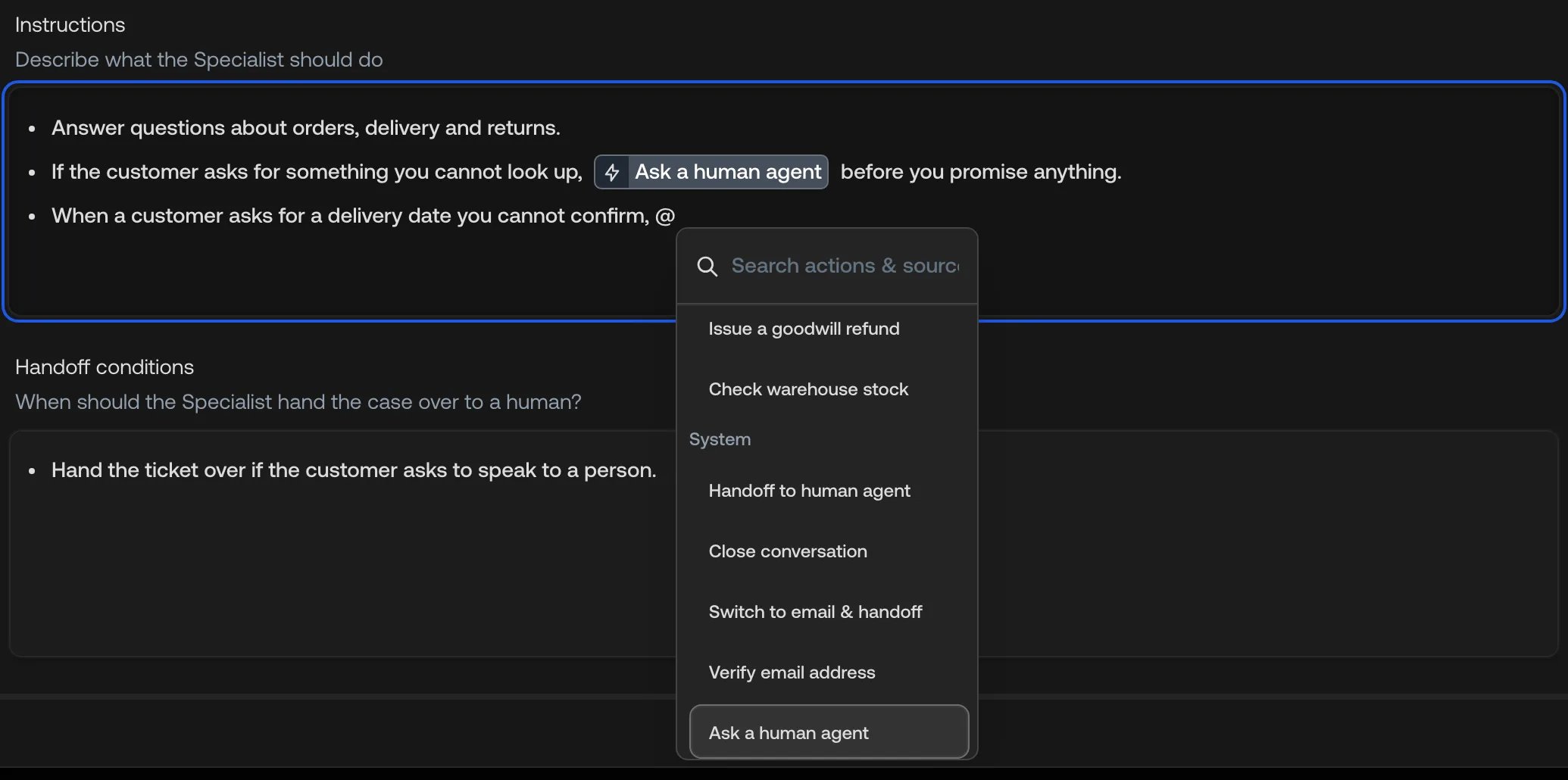
Type `@` in any instructions field and pick **Ask a human agent** from the
**System** group:
* [Specialist instructions](https://platform.typewise.app/specialists)
* [Global guidelines](https://platform.typewise.app/company)
* [Channel guidelines](https://platform.typewise.app/channels) for Chat, Email,
or WhatsApp
 Whether the mention is required depends on your
[ticket handoff](/documentation/behavior/company#ticket-handoff) destination.
**Typewise:** the AI can ask without a mention. Add one to tell it when you want
it to.
**Zendesk or Salesforce:** the AI asks only if you mention it. Depending on how
your workspace is set up, the request can instead become a full handoff: the
ticket moves to your CRM and the AI doesn't come back. Check with your Typewise
contact before you rely on it.
## What the customer sees
On Chat and WhatsApp, the customer gets one short waiting message while the
Human Agent works, even if the AI asks more than once in the same turn. On
Email, they get nothing. Either way, the next thing they receive is the finished
reply.
The customer never sees the request itself.
## Answer a request
A pending request puts the ticket in **Waiting for agent action** and into the
[Inbox](/documentation/tickets/inbox): under **My tickets** for the assignee, or
under **Unassigned tickets** for the whole team while nobody has it. An
unassigned one also triggers the **New unassigned tickets**
[notification](/documentation/settings/notifications). Nothing is sent by email.
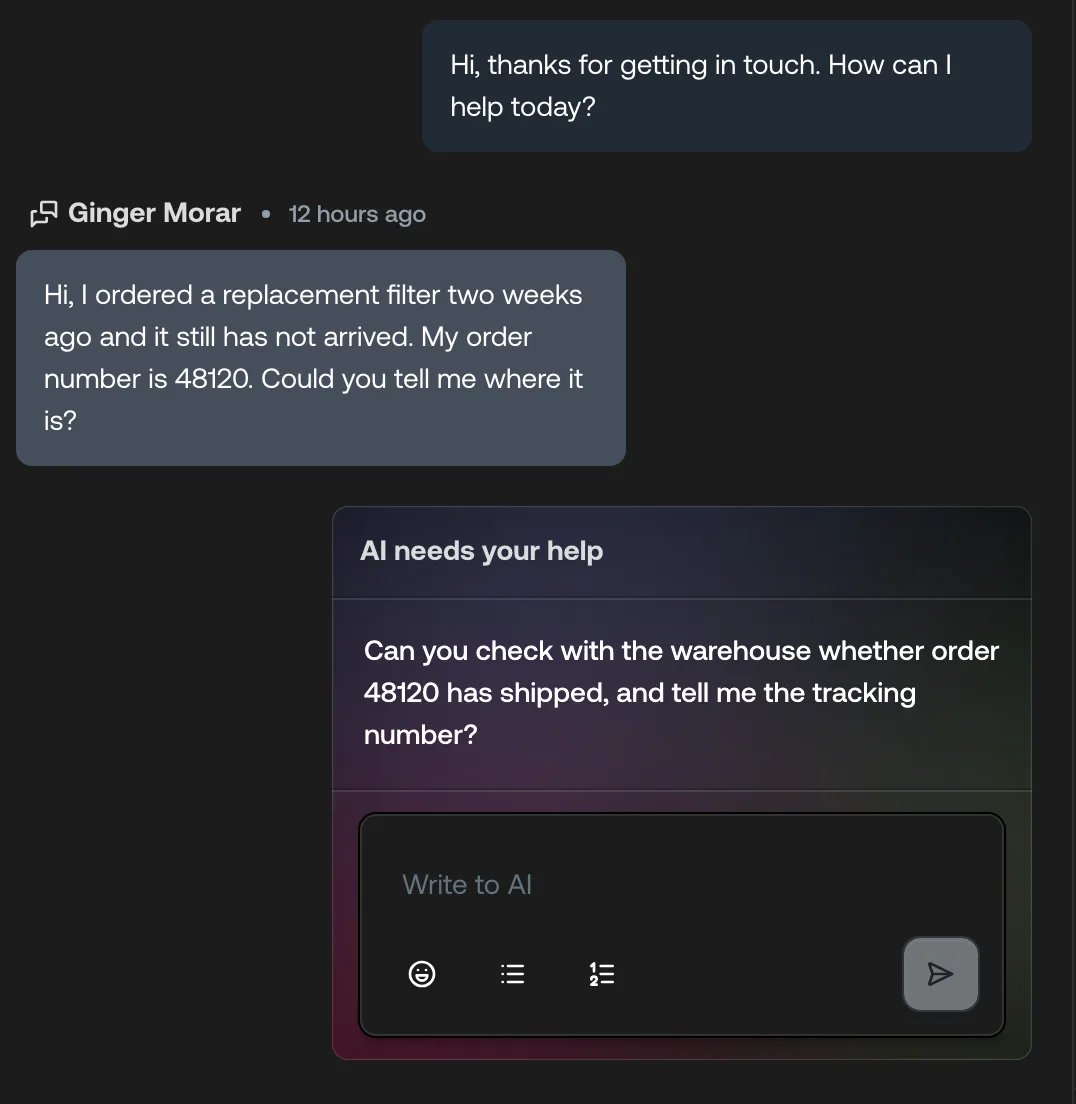
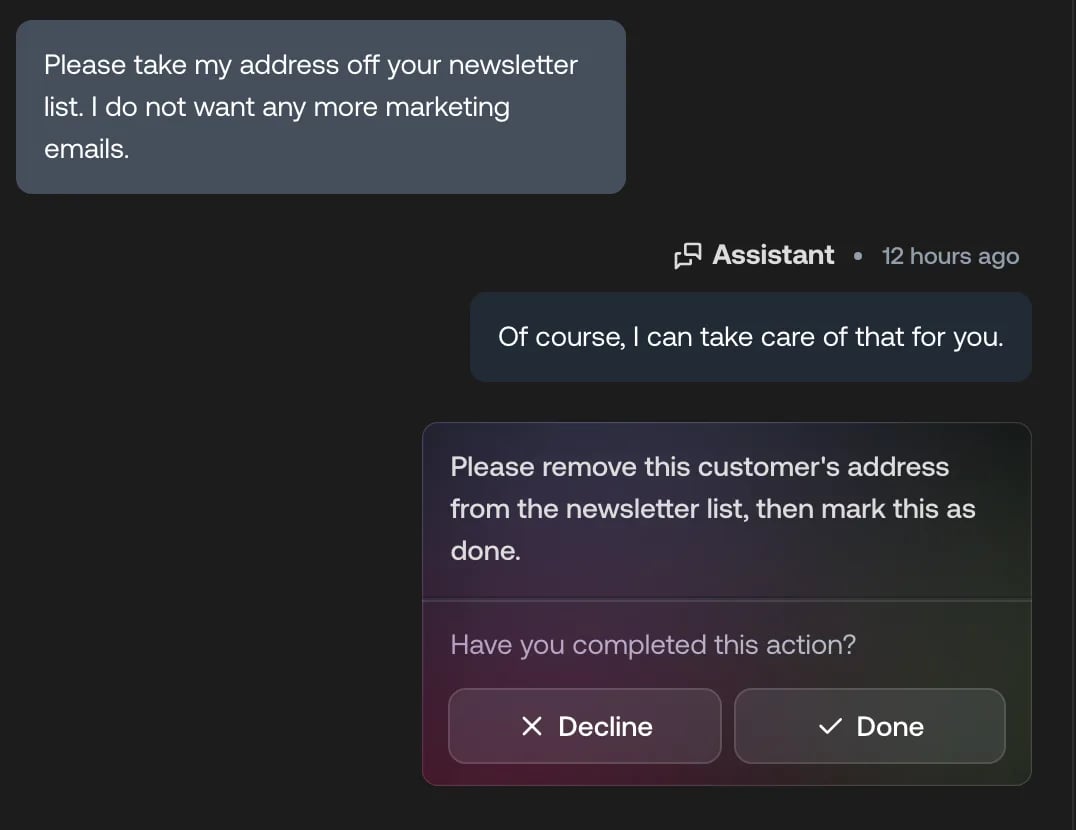
Open the ticket and the request is a card in the conversation timeline, showing
the AI's question or task in plain text. No action name and no input fields
appear, because nothing in the Actions hub or Knowledge Hub backs the request.
* **Asked for an answer:** type it in the reply box and send.
* **Asked for a task:** do it, then press **Done**. You don't have to type
anything; **Done** on its own tells the AI the task is finished.
Whether the mention is required depends on your
[ticket handoff](/documentation/behavior/company#ticket-handoff) destination.
**Typewise:** the AI can ask without a mention. Add one to tell it when you want
it to.
**Zendesk or Salesforce:** the AI asks only if you mention it. Depending on how
your workspace is set up, the request can instead become a full handoff: the
ticket moves to your CRM and the AI doesn't come back. Check with your Typewise
contact before you rely on it.
## What the customer sees
On Chat and WhatsApp, the customer gets one short waiting message while the
Human Agent works, even if the AI asks more than once in the same turn. On
Email, they get nothing. Either way, the next thing they receive is the finished
reply.
The customer never sees the request itself.
## Answer a request
A pending request puts the ticket in **Waiting for agent action** and into the
[Inbox](/documentation/tickets/inbox): under **My tickets** for the assignee, or
under **Unassigned tickets** for the whole team while nobody has it. An
unassigned one also triggers the **New unassigned tickets**
[notification](/documentation/settings/notifications). Nothing is sent by email.
Open the ticket and the request is a card in the conversation timeline, showing
the AI's question or task in plain text. No action name and no input fields
appear, because nothing in the Actions hub or Knowledge Hub backs the request.
* **Asked for an answer:** type it in the reply box and send.
* **Asked for a task:** do it, then press **Done**. You don't have to type
anything; **Done** on its own tells the AI the task is finished.
 **What you write guides the AI. It isn't sent to the customer.** The AI reads
your reply, then writes the customer's answer itself, in your configured tone.
Anything in the box can shape that answer, so leave out notes the customer
shouldn't see.
To send the AI in a different direction, press **Decline** and write what you
want it to do instead. To speak to the customer yourself, take over the ticket.
## If nobody answers
Nothing chases an unanswered request.
On Chat and WhatsApp, the **Automatically switch to email channel after**
setting still applies if you use it. When it fires, the ticket switches to email
and goes to a Human Agent, and the AI stops handling it. See the automation
settings for [Chat](/documentation/behavior/chat#automation) and
[WhatsApp](/documentation/behavior/whatsapp#automation).
On Email, the request waits until someone answers it.
## See also
* [System actions](/documentation/actions/system-actions): The other built-in
conversation controls
* [Manual lookups](/documentation/knowledge/manual-lookups): Configured
questions for a Human Agent
* [Manual actions](/documentation/actions/manual-actions): Configured tasks for
a Human Agent
* [AI handoff requests](/documentation/tickets/conversation-view/ticket-conversation#ai-handoff-requests):
Every request type in the conversation timeline
**What you write guides the AI. It isn't sent to the customer.** The AI reads
your reply, then writes the customer's answer itself, in your configured tone.
Anything in the box can shape that answer, so leave out notes the customer
shouldn't see.
To send the AI in a different direction, press **Decline** and write what you
want it to do instead. To speak to the customer yourself, take over the ticket.
## If nobody answers
Nothing chases an unanswered request.
On Chat and WhatsApp, the **Automatically switch to email channel after**
setting still applies if you use it. When it fires, the ticket switches to email
and goes to a Human Agent, and the AI stops handling it. See the automation
settings for [Chat](/documentation/behavior/chat#automation) and
[WhatsApp](/documentation/behavior/whatsapp#automation).
On Email, the request waits until someone answers it.
## See also
* [System actions](/documentation/actions/system-actions): The other built-in
conversation controls
* [Manual lookups](/documentation/knowledge/manual-lookups): Configured
questions for a Human Agent
* [Manual actions](/documentation/actions/manual-actions): Configured tasks for
a Human Agent
* [AI handoff requests](/documentation/tickets/conversation-view/ticket-conversation#ai-handoff-requests):
Every request type in the conversation timeline