> ## Documentation Index
> Fetch the complete documentation index at: https://docs.typewise.app/llms.txt
> Use this file to discover all available pages before exploring further.
# Manual actions
> Actions that Human Agents perform when the AI Agent requests
Manual actions let the AI Agent request a Human Agent to perform tasks that
can't be automated, either because no API exists or the task requires human
judgment.
**Best for:**
* Systems without API or integration support
* Sensitive tasks requiring human judgment
* Bridging gaps while implementing full integration
## How manual actions work
1. **AI Agent identifies need**: During a conversation, it determines a manual
action is required
2. **AI Agent collects information**: Gathers required data from the customer
3. **Request sent to Human Agent**: Conversation hands off with a pending action
4. **Human Agent executes**: Performs the action in the external system
5. **Human Agent confirms**: Marks the action complete or rejected
## Configure a manual action
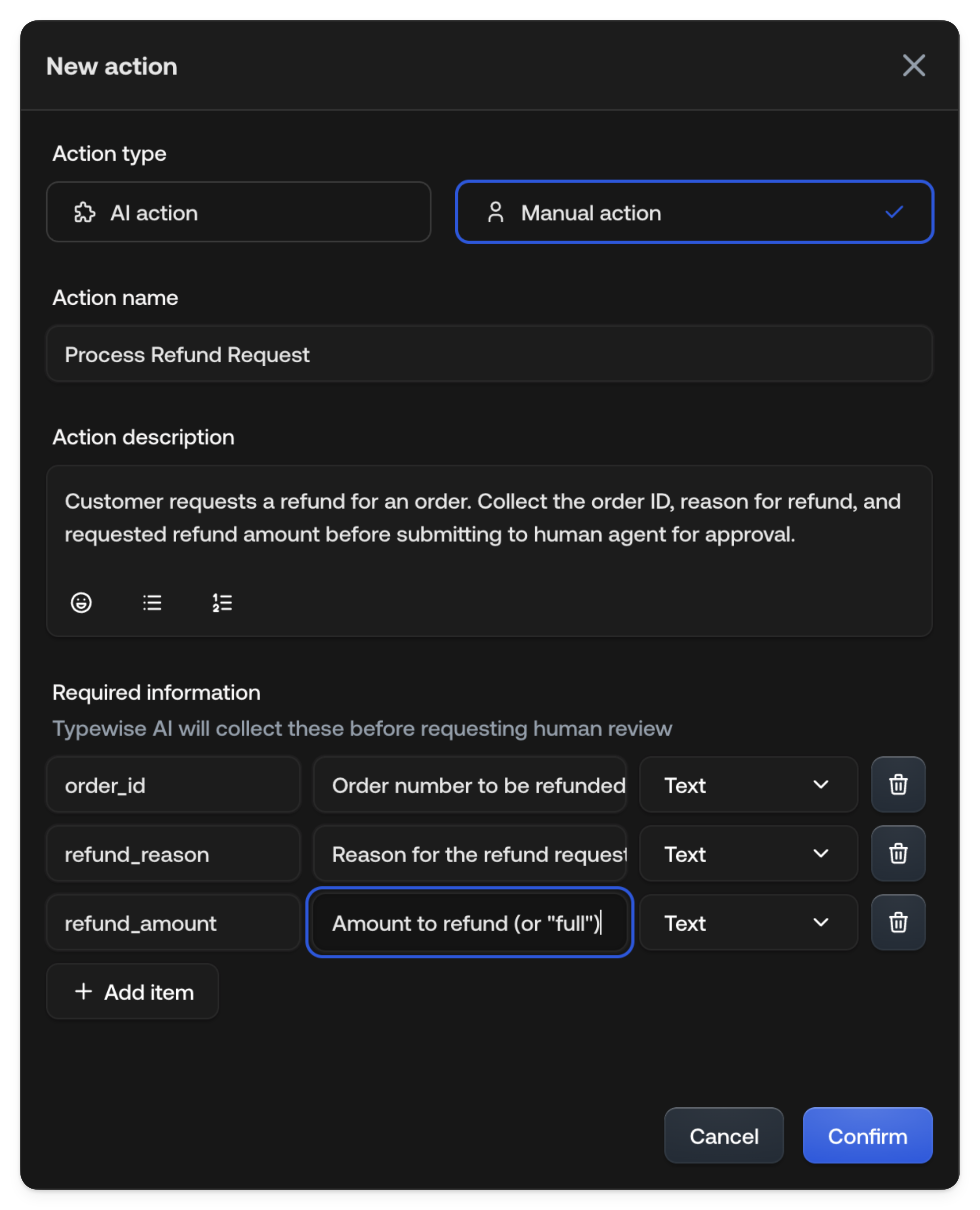 | Field | Description |
| :----------------------- | :---------------------------------------------------------------- |
| **Action name** | Descriptive name (e.g., "Refund Order", "Update Billing Address") |
| **Action description** | When the AI Agent should suggest this action |
| **Required information** | Data the AI Agent must collect before requesting |
### Required information fields
Each field has:
* **Name**: Identifier (e.g., `order_id`, `refund_reason`)
* **Description**: What to ask the customer
* **Type**: Text, Number, or Yes/No
## Human Agent workflow
When the AI Agent requests a manual action, Human Agents see it in their inbox.
### View pending actions
The ticket shows:
* Action requested (e.g., "Refund Order")
* Collected information from the customer
* Conversation context
### Accept or reject
**To accept:**
Review the collected information.
Perform the action in your external system.
Click **Accept** to confirm. Optionally add a note describing what you did.
**To reject:**
Click **Reject**.
Provide a reason (helps the AI Agent respond appropriately). The
conversation returns to AI Agent handling with your feedback.
## Example: Refund order
**Configuration:**
| Field | Value |
| :---------- | :------------------------------------------------------------------------ |
| Action name | Refund Order |
| Description | Use when a customer requests a refund. Collect order ID and reason first. |
**Required information:**
| Name | Description | Type |
| :-------------- | :------------------------------ | :--- |
| `order_id` | Order number to refund | Text |
| `refund_reason` | Why the customer wants a refund | Text |
| `refund_amount` | Amount to refund (or "full") | Text |
**Human Agent sees:**
```
Action Requested: Refund Order
Collected Information:
- Order ID: ORD-12345
- Refund Reason: Item arrived damaged
- Refund Amount: full
Customer Context:
"I received my order yesterday but the package was crushed
and the item inside is broken. I'd like a full refund please."
```
The Human Agent processes the refund, then clicks **Accept**.
## See also
* [AI actions](/documentation/actions/ai-actions): For automated execution
| Field | Description |
| :----------------------- | :---------------------------------------------------------------- |
| **Action name** | Descriptive name (e.g., "Refund Order", "Update Billing Address") |
| **Action description** | When the AI Agent should suggest this action |
| **Required information** | Data the AI Agent must collect before requesting |
### Required information fields
Each field has:
* **Name**: Identifier (e.g., `order_id`, `refund_reason`)
* **Description**: What to ask the customer
* **Type**: Text, Number, or Yes/No
## Human Agent workflow
When the AI Agent requests a manual action, Human Agents see it in their inbox.
### View pending actions
The ticket shows:
* Action requested (e.g., "Refund Order")
* Collected information from the customer
* Conversation context
### Accept or reject
**To accept:**
Review the collected information.
Perform the action in your external system.
Click **Accept** to confirm. Optionally add a note describing what you did.
**To reject:**
Click **Reject**.
Provide a reason (helps the AI Agent respond appropriately). The
conversation returns to AI Agent handling with your feedback.
## Example: Refund order
**Configuration:**
| Field | Value |
| :---------- | :------------------------------------------------------------------------ |
| Action name | Refund Order |
| Description | Use when a customer requests a refund. Collect order ID and reason first. |
**Required information:**
| Name | Description | Type |
| :-------------- | :------------------------------ | :--- |
| `order_id` | Order number to refund | Text |
| `refund_reason` | Why the customer wants a refund | Text |
| `refund_amount` | Amount to refund (or "full") | Text |
**Human Agent sees:**
```
Action Requested: Refund Order
Collected Information:
- Order ID: ORD-12345
- Refund Reason: Item arrived damaged
- Refund Amount: full
Customer Context:
"I received my order yesterday but the package was crushed
and the item inside is broken. I'd like a full refund please."
```
The Human Agent processes the refund, then clicks **Accept**.
## See also
* [AI actions](/documentation/actions/ai-actions): For automated execution