> ## Documentation Index
> Fetch the complete documentation index at: https://docs.typewise.app/llms.txt
> Use this file to discover all available pages before exploring further.
# Company configuration
> Company specifications for AI Agents
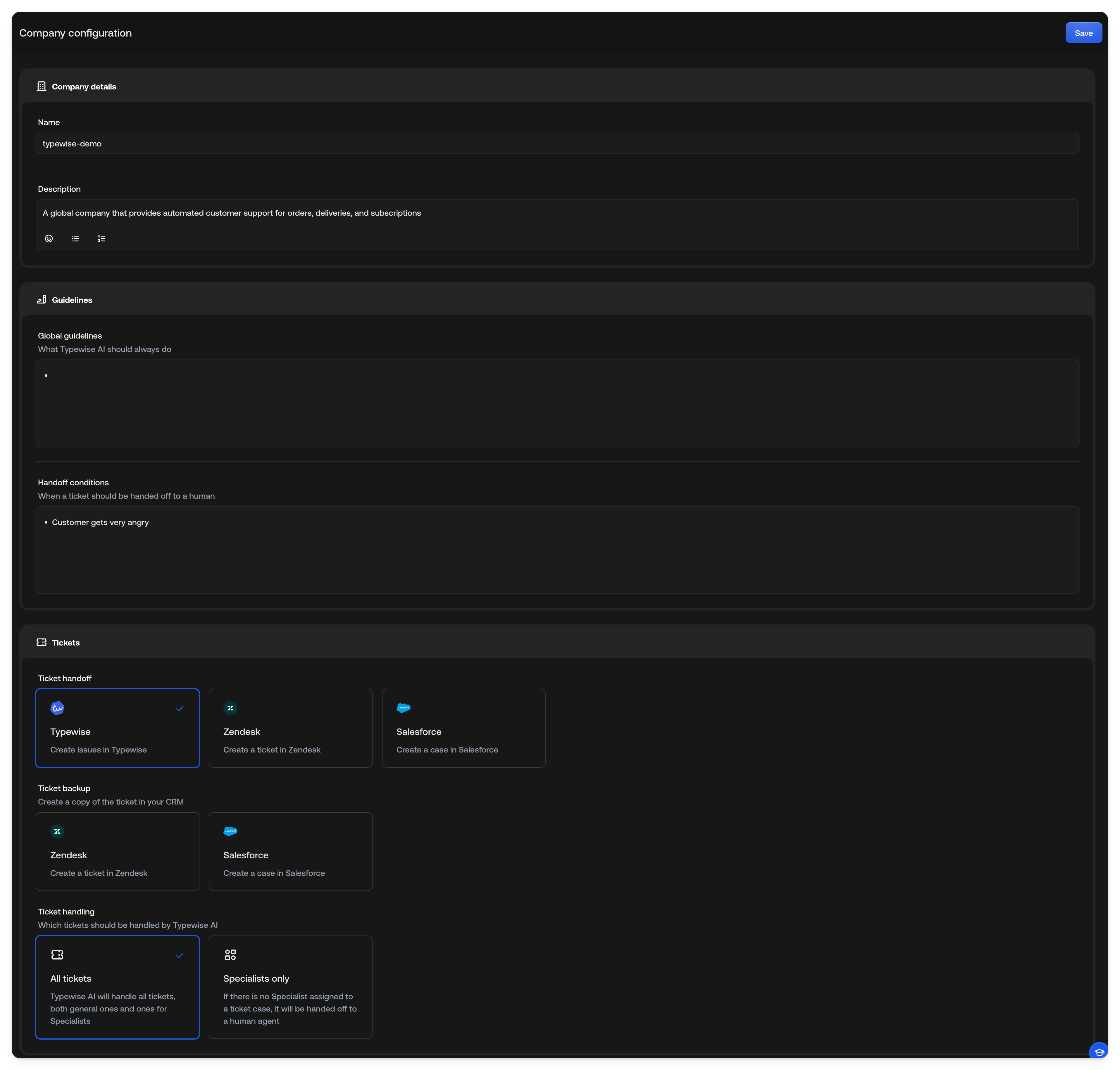
[Company configuration](https://platform.typewise.app/company) defines the
guidelines and best practices that the AI must follow when interacting with end
customers. These rules ensure that the AI maintains a professional, consistent,
and brand-aligned tone while providing accurate and ethical responses. Key
aspects include using clear and respectful language, avoiding sensitive or
confidential topics, adhering to legal and compliance standards, and ensuring
transparency about its AI nature. Additionally, the AI should prioritize user
privacy, avoid misinformation, and escalate complex issues to human support when
necessary.
## Company Description
Briefly describe your company and what it does. This description is also
used as context by the [spam classifier](/documentation/behavior/email#spam-classification)
to help the AI tell legitimate partners and industry-specific topics apart
from generic bulk mail.
## Global Guidelines
List the overarching instructions/rules applicable to all cases. Make sure to
provide it in a clear and easy to follow structure, e.g.
Type `@` in Global guidelines to add
[system actions](/documentation/actions/system-actions) such as **Close
conversation** or **Switch to email & handoff**, the same way you do in
Specialist instructions and channel guidelines.
* **Tone & Style:** Establish whether the AI should be formal, friendly, or
neutral, aligning with the company's brand voice.
* **Clarity & Accuracy:** Responses should be clear, concise, and factually
correct.
* **Response Structure:** Outline the key information the AI must include in its
response (e.g., greeting, solution, next steps).
* **Boundaries:** Specify topics the AI should avoid (e.g., legal advice,
personal opinions, sensitive data).
* **Transparency:** Clearly communicate that users are interacting with an AI.
* **Privacy & Security:** Ensure the AI does not share confidential information
that is intended for internal use only, or information that is not part of the
end customer's profile.
## Handoff Conditions
Define when the AI should transfer conversations to a Human Agent:
* When the end customer is angry
* When the end customer asks to speak to a Human Agent
* ...
## Ticket Handoff
Choose where tickets should be handed off when a Human Agent needs to take over:
* **Typewise:** Tickets are handed off within the Typewise platform. Human
Agents can respond directly in Typewise.
* **Zendesk:** Tickets are handed off to Zendesk. Human Agents must continue the
conversation in Zendesk.
* **Salesforce:** Tickets are handed off to Salesforce. Human Agents must
continue the conversation in Salesforce.
* **Email:** Tickets are handed off via email. When a handoff is triggered, an
email containing the conversation history, customer email, and conversation
summary is sent to your configured email address. The reply-to header is
preset to the customer's email address, so you can click reply to respond to
the customer directly from your email client.
Zendesk, Salesforce, and Email options only appear once the respective
integration is installed or email handoff is configured. See [supported
integrations](/documentation/integrations/overview) to set up CRM
integrations.
## Ticket Backup
Enable ticket backup to automatically synchronize completed tickets with your
CRM or email:
* **Zendesk:** Create a copy of completed tickets in Zendesk.
* **Salesforce:** Create a copy of completed tickets as cases in Salesforce.
* **Email:** Send a copy of completed tickets to your configured email address.
Each backup email includes the conversation history, customer email, and
conversation summary. If the same conversation is backed up multiple times,
subsequent backups are sent as replies in the same email thread.
Backup options only appear once the respective integration is installed or
email backup is configured. See [supported
integrations](/documentation/integrations/overview) to set up CRM
integrations.
## Ticket Handling
Define which tickets should be handled by Typewise AI.
* **All tickets:** Typewise AI will handle all tickets, both general ones and
ones for Specialists.
* **Specialists only:** If there is no Specialist assigned to a ticket case, it
will be handed off to a Human Agent.