> ## Documentation Index
> Fetch the complete documentation index at: https://docs.typewise.app/llms.txt
> Use this file to discover all available pages before exploring further.
# Specialists
> Create topic-specific AI behavior with clear instructions and routing
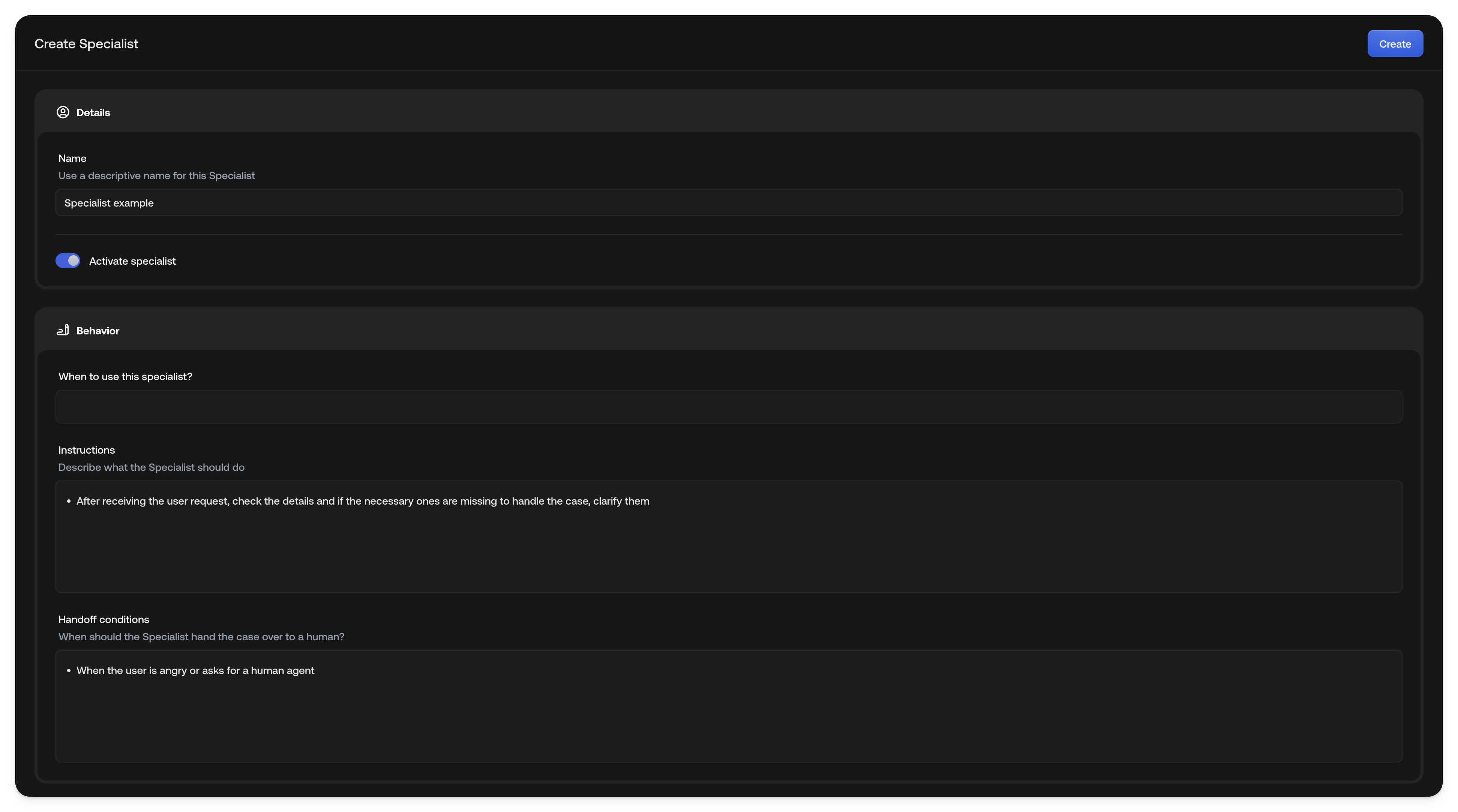
[Specialists](https://platform.typewise.app/specialists) are AI Agents that can
handle end customer inquiries autonomously. We recommend setting up one
specialist per question category, e.g., Warranty requests, Shipping inquiries,
General questions, cancellations, etc.
**When to use this specialist**: Briefly describe when this specialist should be
used. Imagine this to be a very brief job description, e.g., "The end customer
wants to change their subscription".
***
**Instructions**: Write the more detailed instructions/rules the specialist has
to follow when solving end customer inquiries. Imagine this to be a bullet point
list for a new employee with the high-level instructions, actions to conduct,
and knowledge sources to use.
 Choose a name that clearly describes what the Specialist does.
Specify which scenarios the Specialist should handle.
Write a clear, ordered set of steps the Specialist must follow when solving
requests. Use `@` to reference configured Actions and Lookups.
Define when the Specialist should escalate to a Human Agent.
Choose a name that clearly describes what the Specialist does.
Specify which scenarios the Specialist should handle.
Write a clear, ordered set of steps the Specialist must follow when solving
requests. Use `@` to reference configured Actions and Lookups.
Define when the Specialist should escalate to a Human Agent.
 ## Example: "Cancel subscription"
In the Instructions field, type `@` to open the tool picker and select the tools
you need. Selected tools appear as visual pills in your instructions. Here's an
example of what the instructions might contain:
* First look up the end customer's account and subscription details using
**@Read All Customer Info** (lookup)
* If the end customer wants to cancel, determine the reason and reference
**@Subscription Policy Document** (knowledge) to determine the cancellation
policy
* Extra rules, temporary redirects, or pauses are only possible for "Premium"
end customers; offer "Standard" end customers an upgrade
* For date or address changes, ask for the exact new data and confirm the
changes with the end customer
* Perform the desired changes using **@Update Address**, **@Update Subscription
Status**, or **@Update Phone Number** (actions)
* At the end, inform the end customer that changes were completed and ask if
there's anything else you can help with
Actions, Lookups, and Knowledge sources must be configured in their respective
hubs first. Once set up, type `@` in the Instructions field to select them.
They appear as visual pills. Lookups retrieve data without modifying it, while
Actions make changes to external systems. [System
actions](/documentation/actions/system-actions) are built in and do not need a
separate hub setup. You can also add them in global guidelines and channel
guidelines.
## See also
* [System actions](/documentation/actions/system-actions): Close, hand off,
verify the customer, or switch a conversation to email
* [Actions](/documentation/actions/overview): Configure automated and manual
actions
* [Knowledge](/documentation/knowledge/overview): Add knowledge sources for the
AI
* [Company configuration](/documentation/behavior/company): Set global
guidelines
## Example: "Cancel subscription"
In the Instructions field, type `@` to open the tool picker and select the tools
you need. Selected tools appear as visual pills in your instructions. Here's an
example of what the instructions might contain:
* First look up the end customer's account and subscription details using
**@Read All Customer Info** (lookup)
* If the end customer wants to cancel, determine the reason and reference
**@Subscription Policy Document** (knowledge) to determine the cancellation
policy
* Extra rules, temporary redirects, or pauses are only possible for "Premium"
end customers; offer "Standard" end customers an upgrade
* For date or address changes, ask for the exact new data and confirm the
changes with the end customer
* Perform the desired changes using **@Update Address**, **@Update Subscription
Status**, or **@Update Phone Number** (actions)
* At the end, inform the end customer that changes were completed and ask if
there's anything else you can help with
Actions, Lookups, and Knowledge sources must be configured in their respective
hubs first. Once set up, type `@` in the Instructions field to select them.
They appear as visual pills. Lookups retrieve data without modifying it, while
Actions make changes to external systems. [System
actions](/documentation/actions/system-actions) are built in and do not need a
separate hub setup. You can also add them in global guidelines and channel
guidelines.
## See also
* [System actions](/documentation/actions/system-actions): Close, hand off,
verify the customer, or switch a conversation to email
* [Actions](/documentation/actions/overview): Configure automated and manual
actions
* [Knowledge](/documentation/knowledge/overview): Add knowledge sources for the
AI
* [Company configuration](/documentation/behavior/company): Set global
guidelines