

How publishing works
When you make changes in the platform, they’re saved as a draft. Drafts don’t affect your customers until you explicitly publish them.1
Make changes
Edit behavior settings, add knowledge sources, or configure actions. Nothing
is served to your customers until you publish.
2
Test in the simulator
Use the Simulator to
preview your drafts against real conversations.
3
Review and publish
Click Review in the unpublished changes bar to open the review dialog.
Every eligible change is selected by default. Uncheck anything that should
stay as a draft, optionally tweak a change inline, then confirm with
Publish N changes (or leave everything selected to publish all eligible
changes).
Unpublished changes bar
A floating bar appears at the bottom of the platform whenever someone on your team has pending changes.
- Stacked avatars of every teammate who contributed to the pending changes. Hover an avatar to see “Name made some changes”.
- A Review button to open the publish review dialog.
- A Discard button to open the discard review dialog (you choose what to throw away).
Testing changes in the simulator
1
Open the simulator
You can test your unpublished changes in the
Simulator. This helps you
confirm your changes behave as expected before publishing them to your
customers.
2
Create a new conversation
Click + New conversation and make sure Include unpublished changes
is enabled. You can use this toggle to switch between the live and
unpublished configurations.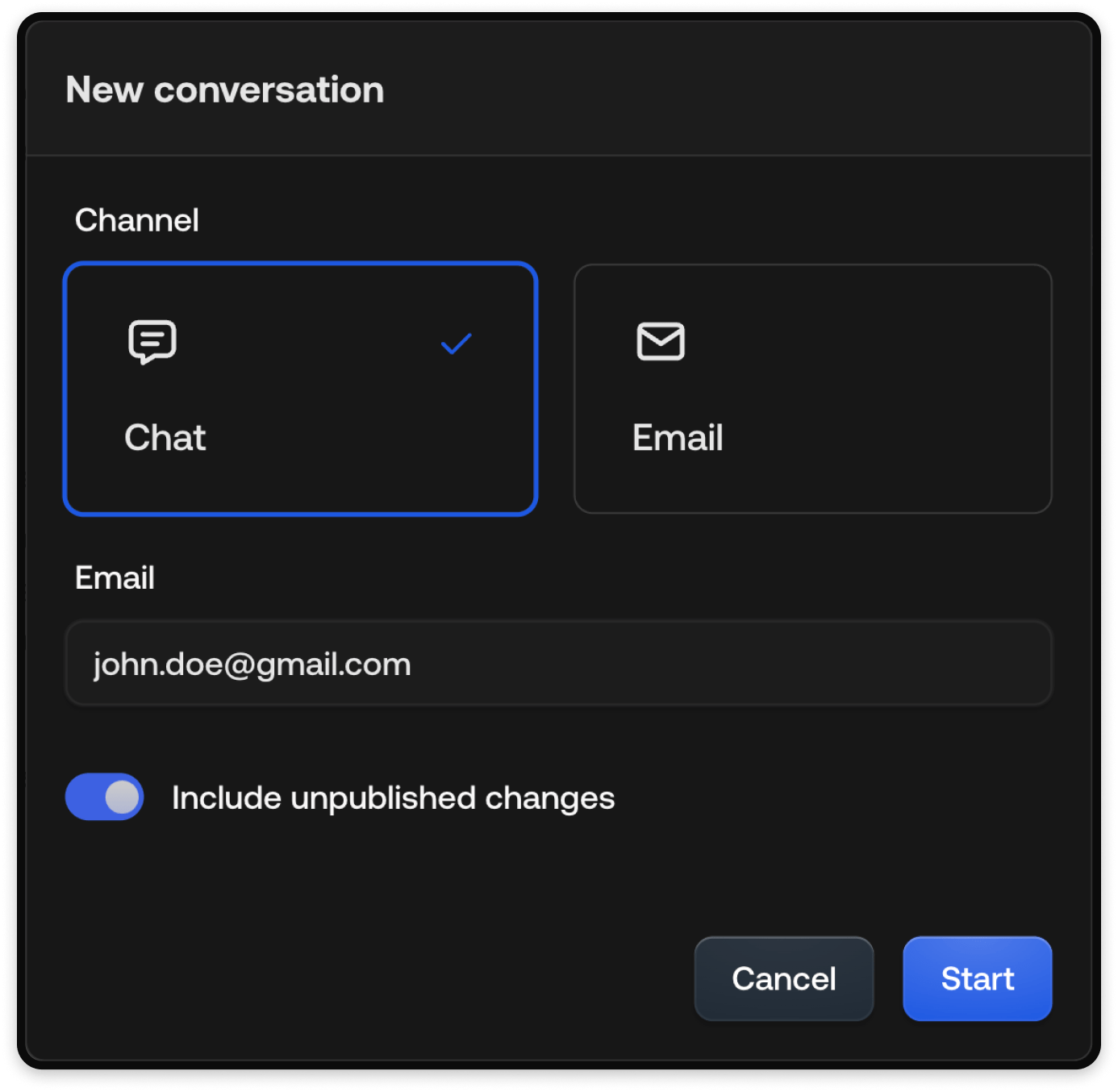
3
Run the conversation
Send messages to your AI Agent and watch how your drafts behave in
real-time.
Reviewing changes
Clicking Review opens the review dialog. It uses a two-pane layout so you can see what changed at a glance, choose what to publish, and act without leaving the dialog.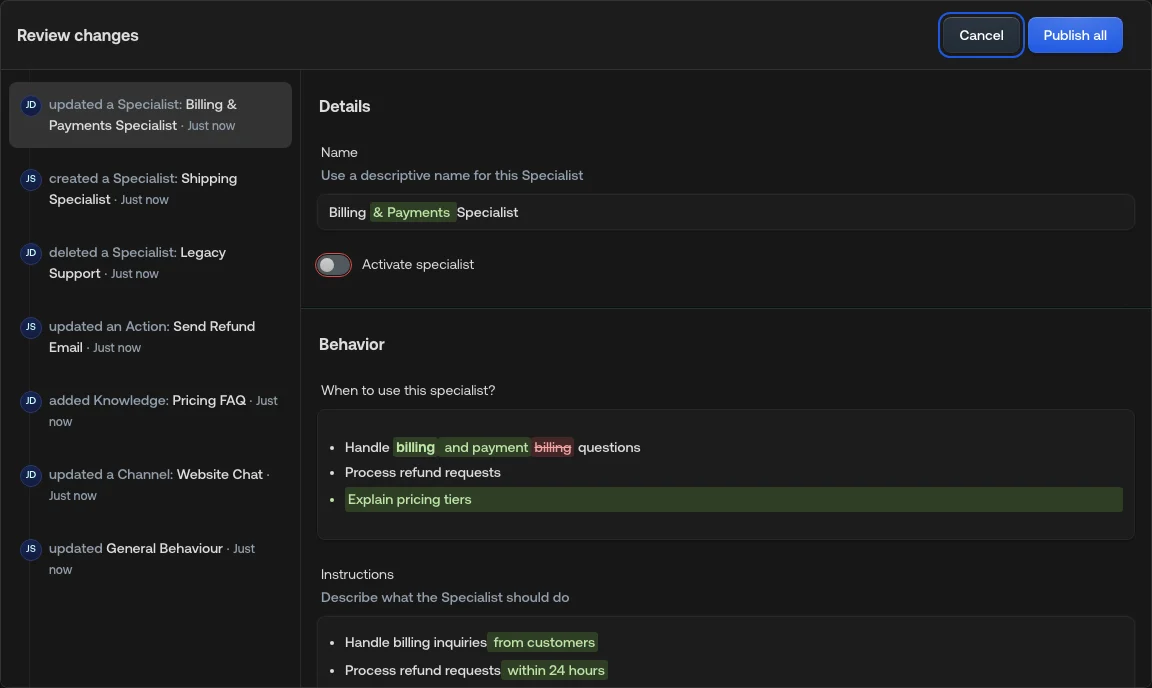
Two-pane layout
- Left pane: one row per changed entity (Company configuration, Chat guidelines, Email guidelines, Specialist, Action, Knowledge source). Entities edited multiple times appear once, with the avatars of every contributor and a relative timestamp. Hover the timestamp to see the exact date and time. Each row has a checkbox so you can include or exclude it from this publish.
- Right pane: the selected entity rendered exactly as it looks on its own
page, with changes highlighted in place.
- A green bar at the top marks new entities.
- A red bar marks deleted entities.
- Updated entities have no bar.
Choosing what to publish
- Uncheck changes that should remain drafts (for example, a teammate’s unfinished work).
- Use Select all at the bottom of the left pane to restore every eligible change. The control is disabled when everything eligible is already selected.
- The primary action shows how many changes you chose, for example Publish 2 changes or Publish 1 change. Auto-included related changes (see below) don’t inflate that count.
- If nothing is selected, Publish stays disabled.
Related changes that must go together
Some drafts depend on each other. When you select a change that needs related unpublished work, Typewise includes that work automatically and locks those checkboxes so the set stays valid. Typical cases:- A Specialist, channel, or general behaviour that uses a new Action or Knowledge source is published together with that Action or source.
- Discarding a new Action or Knowledge source also discards draft changes that still use it.
Blocked deletes
You can’t publish a delete while something that is already live still references that entity. The checkbox stays disabled and unchecked, with guidance to edit the referring configuration first (for example, remove the Action from a published Specialist, then publish that edit together with the delete). Blocked deletes can still be discarded if you decide not to remove the entity after all.How diffs are shown
The right pane highlights changes at the field level. The exact styling depends on the type of control.- Text and instruction
- Checkbox and toggle
- Radio
- Dropdown
- Table and list
Word-level inline diff. Removed text is struck through in red, added text is
highlighted in green.




Editing changes inline
You can tweak any field directly in the right pane without leaving the dialog. Inline edits compound onto the existing diff immediately, so you can see the combined result before publishing.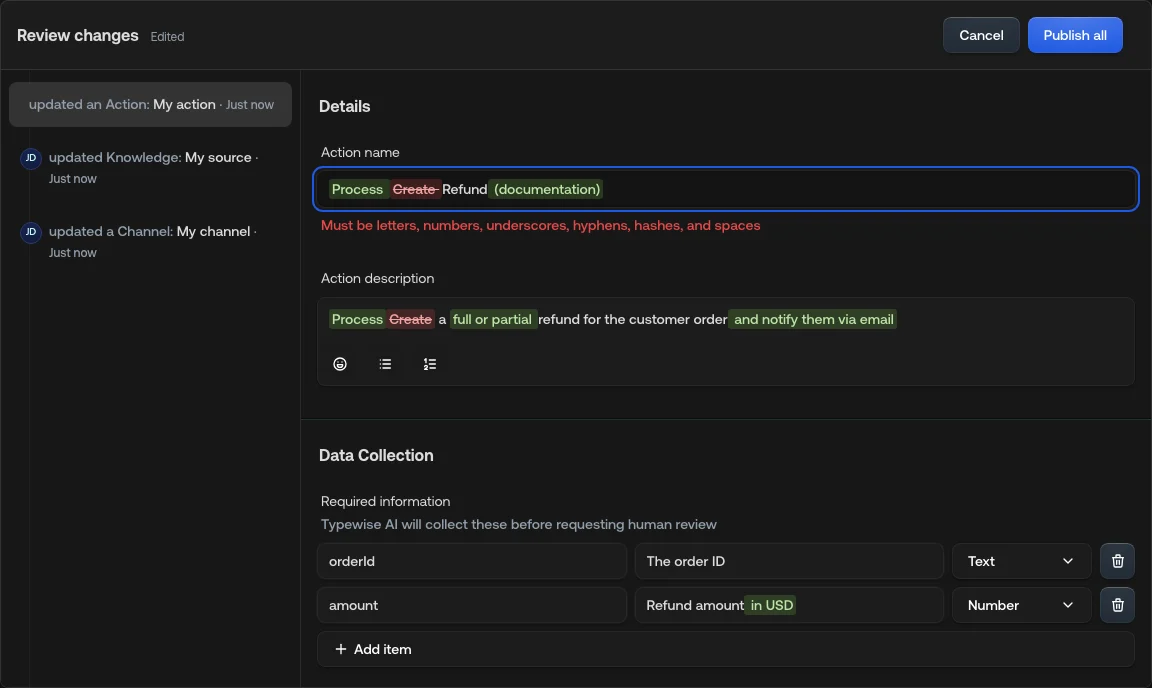
- The dialog title shows an Edited indicator once you’ve tweaked anything in the dialog.
- You can move between changes on the left while keeping inline edits on other entities.
- Save persists inline tweaks without publishing.
- Confirming publish saves any remaining inline tweaks, then publishes only the changes you selected.
Deleted entities are read-only in the detail pane. You can’t tweak something
that’s about to be removed.
Closing with unsaved inline edits
Closing the dialog (the X control) with no inline edits closes immediately. Closing after you’ve made inline edits opens a confirmation.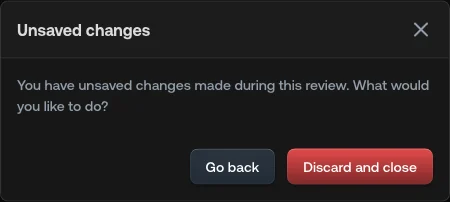
- Go back: return to the review dialog with your inline edits preserved.
- Discard and close: drop the inline tweaks and close the dialog. The original pending changes (from before you opened the dialog) are kept.
Troubleshooting
Nothing appears in the unpublished changes bar
Nothing appears in the unpublished changes bar
Only certain change types qualify for publishing. See the table in What
changes require publishing? below. Chat
widget appearance, email delivery settings, and user and team management
changes apply instantly and don’t flow through the review dialog.
A teammate's change is missing from the list
A teammate's change is missing from the list
Automated and system-only updates (where no user is attached) and Knowledge
Hub crawl-status updates don’t show up in the review list. Every other
contribution appears with the teammate’s avatar.
A checkbox is checked but I can't uncheck it
A checkbox is checked but I can't uncheck it
That change is required by another selected change. Hover the checkbox for
the reason, or uncheck the change that needs it first. Related drafts are
kept together so you don’t publish a broken configuration.
I can't select a delete
I can't select a delete
Something that is already live still mentions that entity. Edit the
referring Specialist, channel, or general behaviour to remove the reference,
then publish that edit with the delete (or discard the delete if you no
longer want to remove the entity).
Discarding changes
Clicking Discard on the unpublished changes bar opens a “Review changes to discard” dialog. It uses the same two-pane layout and selection controls as the publish review, so you can throw away only what you mean to.- Every visible change is selected by default.
- Uncheck drafts you want to keep, then confirm with Discard N changes.
- Related new items that would leave broken drafts are discarded together when needed (same dependency rules as publish, from the discard direction).
- Unselected drafts stay unpublished.
- Closing the dialog keeps your drafts.
What changes require publishing?
Any configuration change that affects the AI Agent’s behavior, knowledge, or actions requires a publish action before it takes effect. Some changes are immediate and don’t require publishing.Changes that require publishing
Changes that don’t require publishing
See also
Company configuration
Configure your AI Agent’s overall behavior.
Chat channel
Configure chat channel settings.
Email channel
Configure email channel settings.
Specialists
Configure Specialist instructions.
Knowledge overview
Add knowledge sources.
Actions overview
Configure AI and manual actions.